


2024 is lining up to be the year when Apple decided to give AI the main stage, and honestly, we’re here for the ride. First, the gossip vine was thick with whispers of iOS 18 turning into an AI powerhouse. Then, bam! Apple drops an open-source AI image editor on us. And just when we thought we had a moment to catch our breath, Apple springs another surprise: an AI application that can make animations out of a static image. Let’s dive into this digital sorcery called Keyframer.
Keyframer is not your run-of-the-mill AI tool. It’s like the wizard in the world of AI, making animations from just a single photo. Imagine taking a snap of your dog sleeping, and with a few taps, it’s dreaming about chasing squirrels in a never-ending loop. Magic, right?
But here’s the kicker: unlike the straightforward AI image generators that only need a prompt, animating stuff requires a bit more elbow grease—timing, coordination, and a bit of creativity. Apparently, the Apple boffins have cracked the code with Keyframer. You start with a 2D SVG (scalable vector graphics) image and use GPT-4 to chat with the program in plain English about how you envision the animation. The app then does its voodoo and spits out animation code. Neat, huh?
Why Keyframer is a Big Deal
Keyframer flexes some serious muscle in the versatility department. Whether you want subtle tweaks or a complete overhaul of your animation, it’s got you covered with its different editor types. The beauty of it all? You just keep on building with each prompt or start fresh based on your last masterpiece.
Picture this: you upload a picture of a serene lake, ask Keyframer to “make a monster rise from the deep every five seconds,” and voilà, you’ve got yourself an animated Loch Ness scene. The true gem here is that Keyframer not only fulfills your animation wishes but also shows you the code it used. So, if you’re feeling brave, you can tinker with the code yourself or simply ask Keyframer to take another shot at it. And since you can build on each result, the sky’s the limit—you can come in with a vague idea and end up with something totally unexpected.
Seeing Is Believing
While Apple’s keeping the actual motion of Keyframer’s animations under wraps for now, the snapshots from their paper give us a sneak peek into the possibilities. There’s an animation frame of a rocket gently bobbing up and down amidst clouds morphing in size, with the moon sneaking lower to craft this illusion of space travel. It’s like peeking into a mini-universe where anything is possible.
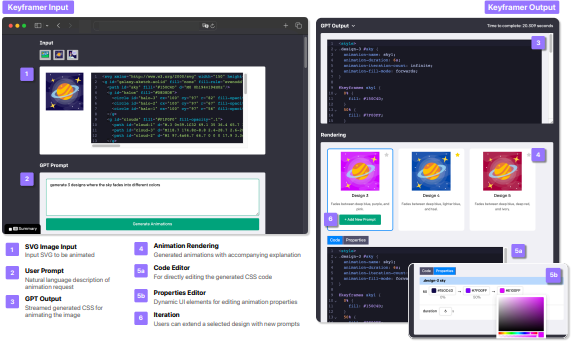
Though we can’t play with Keyframer live yet — unlike the AI image editor that had its demo dance on Hugging Face — the anticipation is half the fun. Imagining what creative chaos we could unleash (in the best way possible) with Keyframer is thrilling.